
The Peak Experience for Pinnacle Series
New and Enhanced Features for Next Level Learning
Pinnacle Series is Eagle Point’s flagship Learning Management System and an industry-leading knowledge resource for Architecture, Engineering, Construction & Manufacturing firms. The Peak Experience enhances the best aspects of classic Pinnacle Series with a top-to-bottom upgrade that delivers major improvements now—and lays the groundwork for long-term
success.
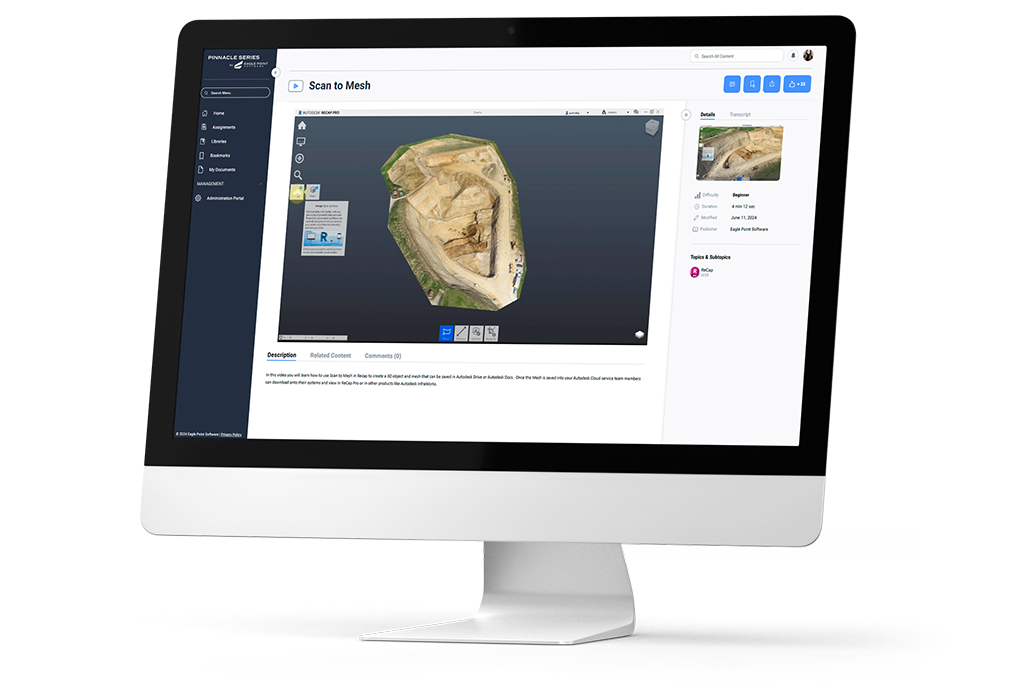
There Is a Brand New Way to Experience Pinnacle Series.
Peak Experience introduces innovative new content organization and publication features, and simultaneously streamlines the management functions users touch every day. Experience unprecedented visibility into key information, complete tasks with fewer clicks, find what you need faster, and enjoy a comfortable new learning view with better screen optimization.
See Peak Experience in action now.
Why Peak Experience?
Quicker Access to Content
A new user interface, improved functionality for Library, Navigation, and Search, and our new Pinnacle AI combine to deliver just-in-time learning to users in just a few keystrokes.
Streamlined Management
Build a framework that matches your unique business with streamlined content and user management tools that allow for permission levels, role-based permissions, and more content editing options.
New and Enhanced Features
Expanded and supercharged features makes it easier to deploy learning in your organization, allowing you to apply and reach L&D goals at lighting speed.
- Future Development
- Feature Availability
Pinnacle Lite
Pinnacle Series
Management
-
Assignments
Assignments
Seamlessly allow managers and leads to assign and track assessments and learning for their teams. Leverage permissions based on your organizational structure to ensure the right users see the right data. Send reminders, extract data, and manage assignments to ensure teams are meeting their goals on time.
-
External Learning
External Learning
Enabling External Learning allows your users to log learning activities they have completed anytime, anywhere outside of the platform. Using this feature, managers can approve these additional learning moments and easily store a user’s entire learning history in one place.
-
Custom Content & Libraries
Custom Content & Libraries
Using your unlimited cloud storage, seamlessly blend subscription and custom content to create the best solution to meet your teams’ needs. With tiered permission levels, your subject matter experts can share their knowledge while easily controlling visibility and publishing to users. Add your existing learning materials, feature the most important libraries, and leverage customized certificates to create a unique learning experience for your organization and your teams.
-
Custom Live Events
Custom Live Events
In Development:
Live Events calendar & tile views, improved ability to register for single or reoccurring events, graphical Live Event details page, improved search & filters capabilities, increased visibility of Live Event data, cleaner user experience, ability to register on behalf of users, ability to invite/assign/register users and view event data based on organizational structure, intuitive access to Live Event data, ability to customize email communications from within the application, ability to create Live Event templates, ability to control visibility of subscription Live Events, ability to edit a single event within a reoccurring series, ability to assign a certificate to a live event. -
SPARK: AI-Powered Nano-Learning
SPARK: AI-Powered Nano-Learning
Enable SPARK Nano-learning for the right teams within your organization, update the AI tool to populate the right learning for users, customize communication settings for new learning, messaging, and more!
-
Reporting
Reporting
The new browser-based reporting portal delivers deeper visibility into how teams learn and perform, with expanded insights across assessments, learning activity, content consumption, and overall platform usage. It includes tiered organizational permissions, advanced filtering by user attributes and metadata, new APIs for seamless integrations, automatic report subscriptions, improved export options, and more – making it easier than ever to measure progress and take informed actions when it comes to employee development.
Settings & Security
-
External User Management
External User Management
External Users enables collaboration and content sharing with users outside of your organization. Empower project success with learning and content sharing with consultants, subcontractors, and more. Share elevated permissions ensure users have the right permissions to support your success. Clear transparency into your external users across the application, in assignments, reporting, and administration.
-
Branding and Customization
Branding and Customization
Create a trusted learning source for your users with customized logos, colors, and images. Ensure users know they are in the right place to find answers, update their skills, and complete their assignments.
-
Active Directory Sync & Single Sign On
Active Directory Sync & Single Sign On
Enhanced features to increase transparency when syncing in your teams and improved notifications and auditing for administrators. These enhancements support the latest standards for user management and automation to ensure data related to users, attributes, groups, and more.
-
Integrations
-
Settings
-
User Management & Permissions
User Management & Permissions
New Features:
Organizational role based permissions for assigning content and assessments, new three tiers of Content Management permissions enabling better control over content creation, publication, and management of organizational standards. -
Group Management
User Experience
-
AI Chatbot
AI Chatbot
Users ask questions within the AI chat tool, which provides curated answers citing Pinnacle Series content with links to the source material. Users will have the ability to expand on questions through the chat.
-
SPARK: AI-Powered Nano-Learning
SPARK: AI-Powered Nano-Learning
Grow you knowledge and avoid learning fatigue with nano-learning in SPARK. Update your areas of interest to ensure this AI-powered tool shares the latest content that is hyper-personalized to you.
SPARK: AI-Powered Nano-Learning
Grow you knowledge and avoid learning fatigue with nano-learning in SPARK. Update your areas of interest to ensure this AI-powered tool shares the latest content that is hyper-personalized to you.
-
Viewing & Consuming Content
Viewing & Consuming Content
New Features:
Cleaner user experience, increased visibility of content data, improved enrollment experience and visibility of course completion status, access to the course description while within a course, an improved quiz consumption experience, visibility to quiz data upon completing the quiz, improved workflow viewing experience.Viewing & Consuming Content
New Features:
Cleaner user experience, increased visibility of content data, improved enrollment experience and visibility of course completion status, access to the course description while within a course, an improved quiz consumption experience, visibility to quiz data upon completing the quiz, improved workflow viewing experience. -
Translations
Translations
You can now easily translate Universal Documents—including Word, PowerPoint, Excel, and PDF files—directly within Pinnacle Series. Break language barriers and make your content accessible to teams around the globe!
Translations
You can now easily translate Universal Documents—including Word, PowerPoint, Excel, and PDF files—directly within Pinnacle Series. Break language barriers and make your content accessible to teams around the globe!
-
Personalized Learning
Personalized Learning
Personalized learning assignment based on assessment results, completion of the personalized learning.
-
Completing & Reviewing Assignments
Completing & Reviewing Assignments
New Features:
Links to KnowledgeSmart, Visibility to assigned assessments alongside assigned learning, better transparency to assignment status, improved searching, card and tile views for learners. -
Role Based Learning
Role Based Learning
In Development:
List and tile view of role based learning, improved user experience of viewing and completing role based learning, improved search and filter functions. -
Libraries
Libraries
New Features: Streamlined theming options, new background image option, easier branding management. Features not added yet: customization of the home page layout, ability to create landing pages, ability to assign layouts based by groups.
Libraries
New Features:
Improved graphical experience for users, ability to combine subscription and custom libraries, abilities to create libraries from a copy of subscription, ability to add library descriptions, publication of content via sharing to groups, faster generation of content, ability to choose between tile and list views, add Featured Libraries for particular groups. -
Work Groups
Work Groups
New Features:
Organizing content for teams and groups is accomplished through Peak Libraries. Additional Classic Work Group features such as notifications, reporting, and assignments will be addressed in future projects. -
Search
Search
New Features:
Modern graphical interface, difficulty and meta data visibility, faster response times, enrolling into content from search, enrollment status visibilitySearch
New Features:
Modern graphical interface, difficulty and meta data visibility, faster response times, enrolling into content from search, enrollment status visibility -
Live Events
Live Events
In Development:
Live Events calendar & tile views, improved ability to register for single or reoccurring events, graphical Live Event details page, improved search & filters capabilities, increased visibility of Live Event data, cleaner user experience, ability to register on behalf of users, ability to invite/assign/register users and view event data based on organizational structure, intuitive access to Live Event data, ability to customize email communications from within the application, ability to create Live Event templates, ability to control visibility of subscription Live Events, ability to edit a single event within a reoccurring series, ability to assign a certificate to a live event.Live Events
In Development:
Live Events calendar & tile views, improved ability to register for single or reoccurring events, graphical Live Event details page, improved search & filters capabilities, increased visibility of Live Event data, cleaner user experience, ability to register on behalf of users, ability to invite/assign/register users and view event data based on organizational structure, intuitive access to Live Event data, ability to customize email communications from within the application, ability to create Live Event templates, ability to control visibility of subscription Live Events, ability to edit a single event within a reoccurring series, ability to assign a certificate to a live event. -
My Assets / Bookmarks / Documents
My Assets / Bookmarks / Documents
New Features:
Separation of My Documents and Bookmarks, improved visibility of content details, faster adding and removing for Bookmarks, improved graphical user experience.My Assets / Bookmarks / Documents
New Features:
Separation of My Documents and Bookmarks, improved visibility of content details, faster adding and removing for Bookmarks, improved graphical user experience. -
External Learning (End User)
External Learning (End User)
Using the enhanced External Learning functionality, easily add learning you have completed anywhere into Pinnacle Series creating a single location for all of your learning records. Upload certificates, documentation, and more to share your continued learning with your leadership teams.
-
User Profile
User Profile
New Features:
Transcript area with download options, access to platform downloads. Features not added yet: submitting external learningUser Profile
New Features:
Transcript area with download options, access to platform downloads. Features not added yet: submitting external learning -
Notifications
Notifications
In Development:
Visibility to notifications in the interface, link to KnowledgeSmart, pop out to view longer notifications.Notifications
New Features:
Visibility to notifications in the interface, link to KnowledgeSmart, pop out to view longer notifications, send notifications on individual content items, trigger and receive notifications on new content published to libraries .
Hover over the dots to learn more about the feature!
Got it!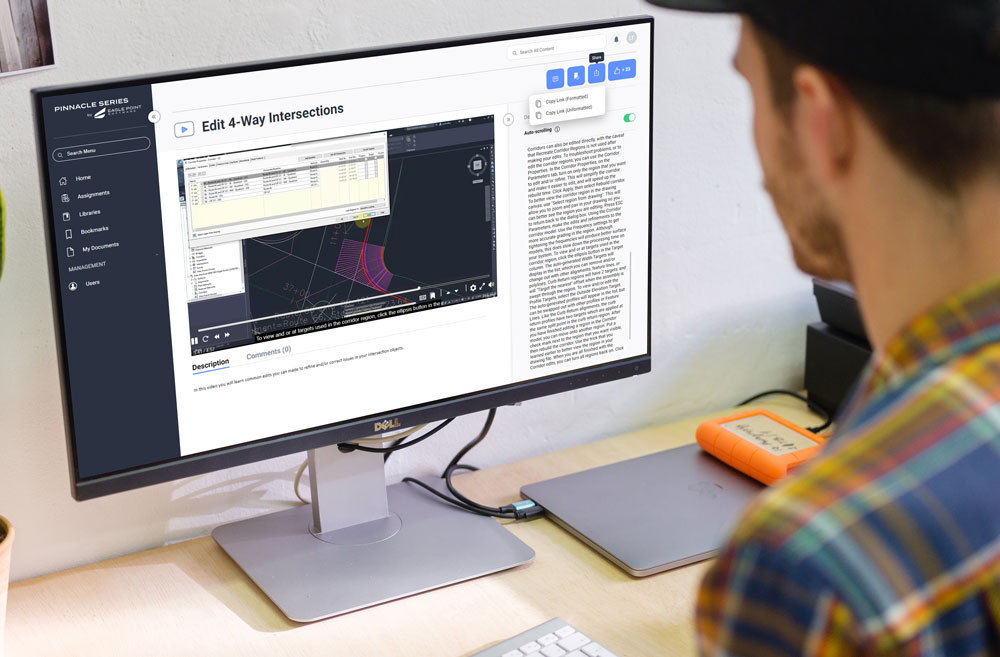
Level up learning at your organization with Peak Experience for Pinnacle Series.
Create a culture of learning with Pinnacle Series. Schedule a demonstration and explore how Peak Experience for Pinnacle Series can transform training, knowledge sharing, and collaboration within your organization.